
Ask your notes (AI)
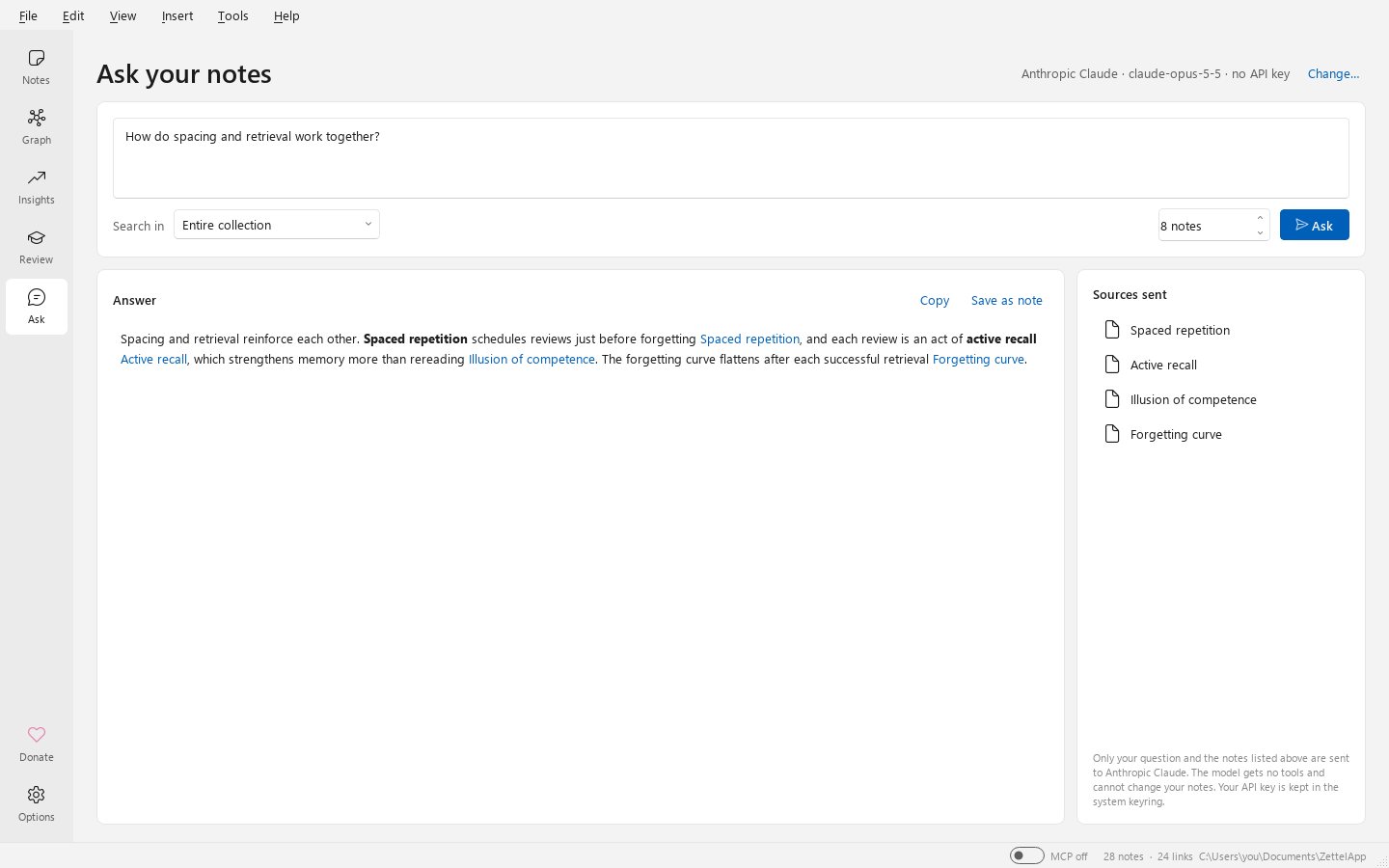
The Ask page (Ctrl+5) answers questions from your notes, with citations you can click. It uses an AI provider of your choice with your own API key. It is entirely optional: nothing is sent anywhere until you ask a question.
Set up
-
Get an API key from one of the supported providers.
-
Open Tools ▸ Options ▸ AI assistant. Choose the provider, paste the API key, and choose a model (Refresh list asks the provider which models your key can use).
You can save several keys per provider (for example personal and work). Use Add key…, Rename and Delete next to the key list; the selected key is the one used by Ask.
-
Press Test connection, then OK.
| Provider | Default model | Other suggested models | Endpoint |
|---|---|---|---|
| Anthropic Claude (default) | claude-opus-5-5 |
claude-sonnet-5-5, claude-haiku-5-5 |
https://api.anthropic.com |
| OpenAI | gpt-6.1-sol |
gpt-6-astra, gpt-6-luna |
https://api.openai.com/v1 |
| Z.ai (GLM) | glm-5.3 |
glm-5.3-flash, glm-4.7-flash |
https://api.z.ai/api/paas/v4 |
You can type any model ID your key has access to. Endpoint (optional) overrides the address, for
example to use a Z.ai coding-plan endpoint, an OpenAI-compatible proxy, or a model running on your own
computer (http://localhost:…). Addresses must use https://; plain http:// is accepted only for
localhost.
With Claude you can also set the effort (low to max): higher effort thinks more before answering, and costs more. The default is medium.
Bring your own LLM
Ask uses your own account with the provider you pick, so any usage is billed by that provider to you. ZettelApp has no AI service of its own. Your API key is saved in the system keyring (Windows Credential Manager, or the Secret Service — GNOME Keyring or KWallet — on Linux), never in settings files.
- Providers: Anthropic Claude, OpenAI and Z.ai (GLM), in Tools ▸ Options ▸ AI assistant ▸ Provider. Pick a Model from the list (Refresh list asks the provider which models your key can use) or type any model ID your key has access to.
- Your own server: any service that offers an OpenAI-style chat completions API works. Choose
OpenAI and set Endpoint (optional) to its base address, for example
https://my-proxy.example.com/v1,http://localhost:11434/v1(Ollama) orhttp://localhost:1234/v1(LM Studio). Plainhttp://is accepted only forlocalhost,127.0.0.1and::1; everything else must usehttps://. For those local addresses the API key may stay empty. - Check it: press Test connection. For a local model, your question and notes never leave your computer.
- What is sent: only your question and the most relevant notes, found on your computer. The number of notes is the how many notes box on the Ask page (8 by default), and the Sources sent list shows exactly which ones went.
Ask a question
Type a question and press Ask (Ctrl+Enter). Choose where to look with Search in: the entire collection, the open note and its linked notes, or the notes with a tag. Choose how many notes to send.
Send chooses what goes with the question: The most relevant notes (the number in the box), or Every note in the scope, nearest first. With Current note and linked notes, the second sends the open note's neighbours up to the depth chosen (its k-hop neighbourhood), the nearest first, as many as fit. Tick Review before sending to see the list of notes first and untick any to leave out.
What happens:
- ZettelApp finds the most relevant notes on your computer, using the same TF-IDF and LSA similarity as the link suggester. With Current note and linked notes, the open note always comes first.
- Your question and those notes are sent to the provider, at most 120,000 characters of notes. A note cut to fit ends with a visible "[note truncated]" marker. The Sources sent list shows exactly which notes were sent.
- The answer streams in as it is written. Citations like
[[20261027153012]]appear as links to the notes. Stop cancels it.
The model is told to answer only from your notes and to say when they don't contain the answer. Copy
copies the answer as Markdown. Save as note keeps it as a new note tagged ai-answer, with cites::
links to its sources.
Privacy and safety
- Only what you ask is sent: your question and the notes listed under Sources sent. A notice reminds you of this before you ask (tick Don't show this again to skip it).
- Your API key is stored in the system keyring (Windows Credential Manager, or the Secret Service
on Linux; as
ZettelApp/llm/<provider>, orZettelApp/llm/<provider>/<key id>for further keys), never in settings files or logs, and it is removed from any error message shown to you. Delete removes it from this computer. - The model has no tools. It can't search the web, run code or change your notes, so instructions hidden in a note (or an imported file) can't make it do anything. The answer is shown through the same safe renderer as notes, with no HTML or scripts.
- With Claude, ZettelApp uses Anthropic's official SDK and opts into server-side refusal fallback: if a request is declined by a safety classifier, Anthropic retries it on its recommended fallback model. This applies to Claude Opus 5.5, Opus 5, Sonnet 5.5 and Fable 5.1.
- Each provider's own terms and data policies apply to what you send.
Adding another provider
Providers live in a small registry (PROVIDERS in zettelapp/core/llm.py). A service that speaks an
existing protocol (Anthropic's Messages API, or OpenAI-style chat completions, which many providers
offer) is one entry: its name, endpoint, default model and the page where users get a key. A new
protocol needs a small adapter class. See Development.